Buying replacement ink starts with a precise match. A cartridge can have the right color, a familiar number and an attractive price while still being the wrong choice for your printer. The details that decide the purchase are the complete printer model, its regional cartridge family, the replacement cartridge number, any chip requirements and the contents of the pack.
Acaves offers several cartridge formats, including black and tri-color combinations, sets of individual colors, and versions with different chip arrangements. This guide explains how to read those differences before ordering. It also shows how to compare the declared page yields without turning a laboratory-style estimate into a promise about your own documents.
Keep your printer nearby while you read. A photograph of its model label and the installed cartridge labels will make the process easier. Then work through the checks in order, beginning with the printer rather than the price.
1. Write down the complete printer model
“HP printer,” “Canon PIXMA” and “Brother all-in-one” are useful starting descriptions, but they are too broad for choosing ink. Even a printer series can contain several models. Record the full model, including its final letters and numbers.
Look for the name on the front or top of the printer. If the visible name seems incomplete, check the identification label and the printer’s settings or support information. HP distinguishes the model name, product number and serial number: the model identifies the type of printer, while the serial number identifies the individual machine. Its product-identification guide explains those differences.
Create a short note you can reuse:
| Detail | What to record |
|---|---|
| Printer manufacturer | HP, Canon or Brother |
| Complete model | Every number and suffix shown |
| Country of purchase | Especially important for imported printers |
| Installed cartridge numbers | Include XL, XXL and color identifiers |
| Account or subscription status | Any relevant printer-service enrollment |
| Current problem | Low ink, empty cartridge or a recognition message |
Do not post your printer’s serial number in a public review or comment. You can compare ordinary compatibility information using the model and cartridge family. Keep the serial number for situations where the manufacturer or a legitimate support service specifically needs it.
If you are shopping for someone else, ask for photographs instead of a remembered model name. That small step can prevent an unnecessary return.
2. Match the cartridge family separately
Once you know the printer model, identify the cartridge family it uses. Treat the printer number and cartridge number as two separate pieces of information. A printer model containing “67,” for example, does not automatically take a 67-series cartridge.
The installed cartridge label is a useful reference if that cartridge previously worked. Your printer manual or the manufacturer’s supplies page provides another check. Compare both with the complete compatibility list for the Acaves item you are considering.
The Acaves 63XL, 65XL and 67XL combinations illustrate why the full number matters. All three listed packs contain one black cartridge and one tri-color cartridge. That shared arrangement does not make the cartridge families interchangeable. Choose the family specified for your exact printer.
Use the same discipline with four-cartridge sets. A pack containing black, cyan, magenta and yellow tells you its color arrangement. It does not identify which printer accepts it.
When reading a product title, separate these components:
- Family: the replacement cartridge number.
- Capacity label: standard, XL or XXL.
- Color: black, tri-color or an individual color.
- Quantity: the number of cartridges included.
- Chip arrangement: included, absent or otherwise specified.
A title is an introduction to the item. Before purchasing, open the specifications and compatibility section too. If the title and detailed description disagree, resolve that discrepancy rather than selecting whichever wording suits your printer.
Browse Acaves ink for HP printers, Canon printers or Brother printers after recording the exact cartridge family.
3. Check the country and region
A familiar printer name does not eliminate regional questions. HP’s cartridge compatibility reference shows that cartridge numbers can differ across markets within a printer family. This matters when a printer was imported, bought while living abroad or acquired secondhand.
Start with the country where the printer was originally purchased. Then check the cartridge numbers listed for that region and compare them with the cartridge currently installed. A US delivery address does not, by itself, establish that the printer uses US-market supplies.
Consider a household that brings its printer after moving to the United States. Searching only a shortened model name on a US storefront may produce a convincing result. The more reliable approach is to compare the original regional documentation and the known working cartridge number.
If those references conflict, contact the printer manufacturer before buying replacements. Avoid assuming that a cartridge with a different regional number can be made suitable through a routine setting change.
For a used printer with no purchase history, collect what you can: the complete model label, the cartridges inside it and any regional information in its documentation. Keep the decision open until the family is established.
This check takes little time when everything agrees. It becomes especially valuable when the printer’s history is unfamiliar.
4. Read the pack contents literally
A two-pack may be a black and tri-color combination or two black cartridges. A five-pack may contain two different black channels alongside cyan, magenta and yellow. The quantity alone cannot tell you whether the pack replaces every cartridge in your printer.
These Acaves examples show several distinct arrangements:
| Acaves option | Listed contents | Important distinction |
|---|---|---|
| 63XL combination | One black, one tri-color | Two cartridges, not four individual colors |
| 65XL combination | One black, one tri-color | Its family must match separately |
| 67XL combination | One black, one tri-color | Similar pack format does not mean interchangeability |
| 910XL set | Black, cyan, magenta, yellow | Four individual cartridges |
| LC401XL set | Black, cyan, magenta, yellow | Brother-family replacement set |
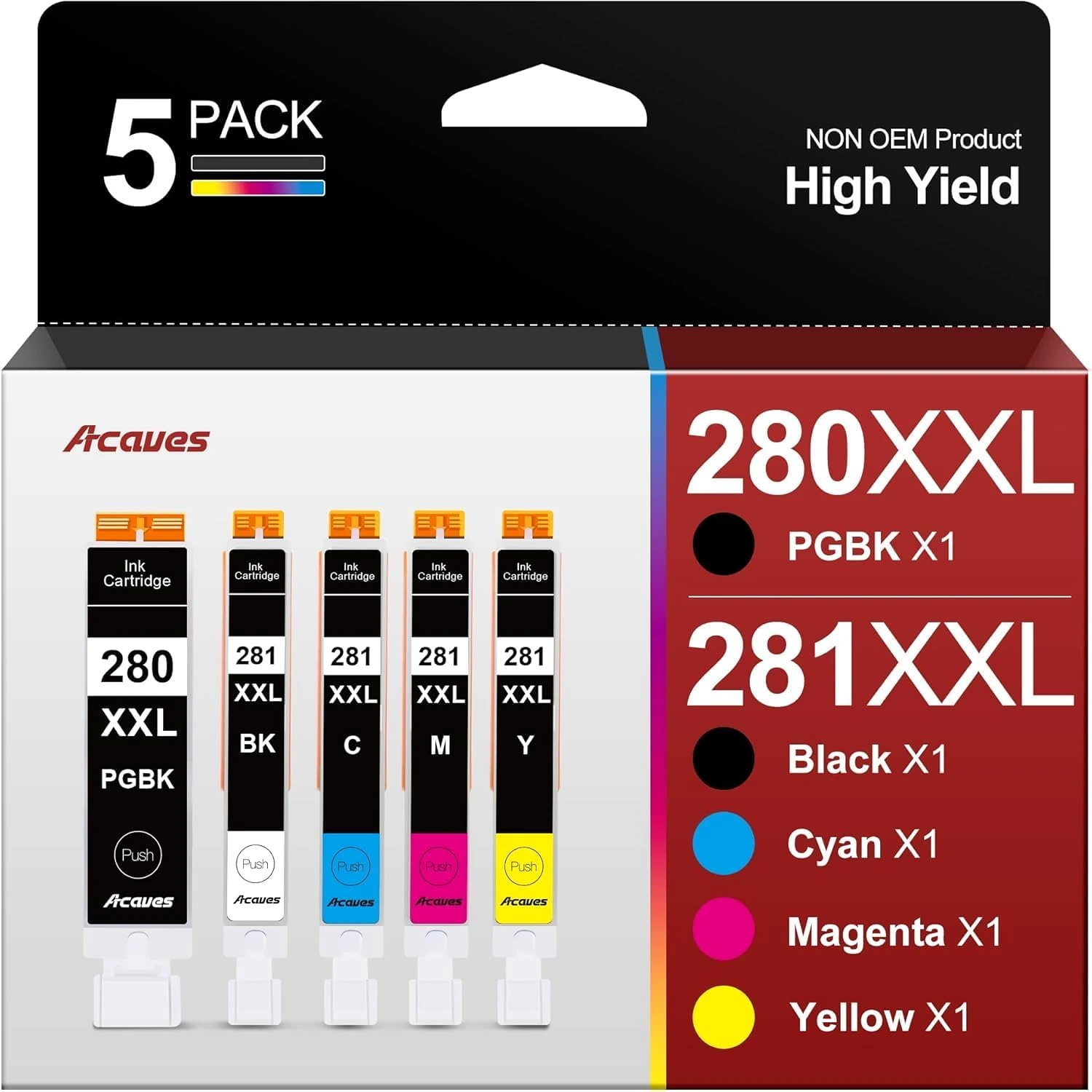
| 280XXL/281XXL set | PGBK, BK, cyan, magenta, yellow | Two distinct black positions |
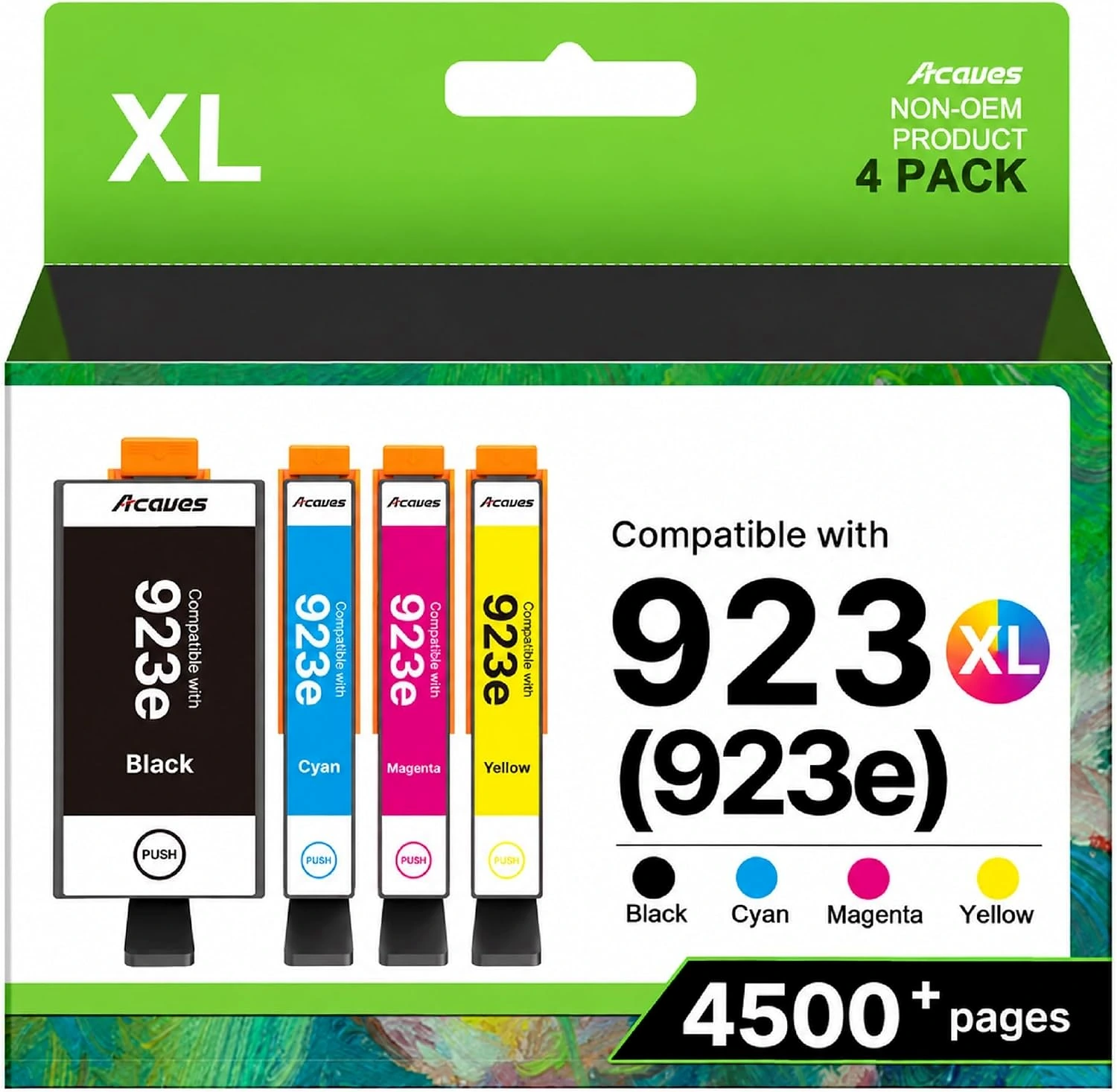
| 923XL set with chips | Black, cyan, magenta, yellow | Chips included |
| 923 set without chips | Black, cyan, magenta, yellow | Chip provision requires separate attention |
Compare that list with the slots in your printer. Do you need a complete replacement set, a spare black cartridge or one depleted color? A full set might be convenient, but it should be a deliberate purchase.
For a shared office, record what is already in the supply cupboard. Buying another complete set while several unused color cartridges remain can create an uneven stockpile. A simple inventory of sealed cartridges helps you compare packs by what you will actually use.
5. Understand black, tri-color and individual-color systems
A black and tri-color combination supplies two physical cartridges. The tri-color cartridge contains the color component of that system; it should not be counted as three separate replacement cartridges.
A four-color set supplies individual black, cyan, magenta and yellow cartridges. When comparing offers, write the included quantity beside each color. That prevents a large number in a title from obscuring how the pack is divided.
The Acaves 280XXL/281XXL five-pack adds another distinction: PGBK and BK are separate positions. They are not simply two copies of the same black cartridge. Canon’s TR7600-series ink table separately identifies PGI-280 PGBK and CLI-281 BK, alongside the three color tanks.
For that Acaves pack, check both black identifiers and the complete printer compatibility list. Do not replace one black position with the other because the colors look alike on the package.
The underlying ink system also deserves attention. Canon documents examples that combine pigment black with dye-based inks. That is a printer-specific arrangement, not permission to substitute any bottled dye or pigment ink.
Our guide to ink types explains the broader distinction. For a cartridge purchase, the immediate task is simpler: match the family, slot and color exactly.
6. Treat chip requirements as a purchase decision
A cartridge’s electronic interface can matter as much as its physical shape. When a listing specifies that chips are included or absent, read that information before comparing prices.
The Acaves 923XL set with chips and the Acaves 923 set without chips are different buying propositions. The chipless set requires suitable existing or replacement chips. Its lower-looking item price, if any, would not describe the complete purchase unless that requirement is already covered.
Before choosing the chipless version, establish:
- Which chips the exact product requires.
- Whether you already have suitable chips.
- Whether the product instructions describe a supported transfer procedure.
- Whether any additional parts or tools are needed.
- What support and return conditions apply if recognition fails.
Do not assume a chip from a similarly named cartridge is suitable. Do not discard the existing cartridges before reviewing the replacement instructions.
A with-chip listing also deserves scrutiny. “Chips included” describes the supplied configuration; it is not an unconditional promise of recognition in every printer, firmware state or account configuration.
HP explains that certain printers use dynamic security to authenticate cartridge electronics and that firmware changes can affect some third-party cartridges. Its dynamic-security document distinguishes non-HP electronics from reused original HP security components. That general explanation does not establish which electronic components are present in a particular Acaves item.
If the listing does not answer the relevant chip question, obtain product-specific confirmation. Avoid treating an old review from a different printer configuration as a substitute.
7. Keep HP+ and firmware questions separate
A printer’s model, firmware and service enrollment are related checks, but they are not the same check.
The Acaves 923XL listing excludes printers with activated HP+. That exclusion belongs in the buying decision before checkout. A matching cartridge number does not cancel it. If you are unsure whether HP+ was activated, check the printer’s account and setup information.
Do not decide solely from an “e” in a printer name. Verify the actual configuration and the restrictions attached to the exact product.
Firmware is another question. Record the installed version when a cartridge listing or support conversation asks for it, and read relevant manufacturer guidance. Avoid following generic advice to disable updates simply to complete a purchase. Security and cartridge recognition both deserve informed consideration.
For a printer managed by an employer, school or other organization, involve the person responsible for its configuration. They may have supply policies or account information that are invisible at the printer itself.
A useful purchase record contains the cartridge SKU, the model it was bought for, the relevant exclusions and the date checked. If a problem appears later, those details are more useful than remembering that the cartridge was advertised as “compatible.”
8. Interpret XL and XXL within the right family
XL and XXL are capacity labels. They are not universal sizes, interchangeable standards or guarantees of a particular number of pages.
Begin by confirming that the printer accepts the cartridge family and capacity variant. Then compare the declared yield, pack contents and current price for the exact options under consideration.
Do not use an Acaves 63XL yield to predict the output of a 65XL or 67XL cartridge. Likewise, a higher-capacity label in one system does not create a meaningful comparison with a different printer system.
Your printing pattern matters to the purchasing decision. Someone printing regular batches of documents may value fewer replacement purchases. Someone printing occasional forms may prefer a smaller immediate order and less spare stock. Neither choice can be made from the XL label alone.
For a business purchase, ask a practical question: how much printing must this order cover before the next planned supply check? That creates a useful buying target without assuming that a declared cartridge yield will match every job.
Keep capacity comparisons within clearly matched families whenever possible. It is much easier to evaluate two suitable options than to compare several incompatible packs that happen to advertise large numbers.
9. Read Acaves page yields with their stated limits
The figures below are listing declarations for the specified Acaves options. They are stated at 5% coverage on A4 paper. These declarations do not establish an ISO-tested result or guarantee output for your documents.
| Acaves option | Declared black yield | Declared color yield |
|---|---|---|
| 63XL combination | 750 pages | 450 pages for tri-color |
| 65XL combination | 669 pages | 427 pages for tri-color |
| 67XL combination | 705 pages | 455 pages for tri-color |
| 910XL four-pack | 1,200 pages | 1,000 pages for each color |
| LC401XL four-pack | 560 pages | 510 pages for each color |
| 923XL with chips | Confirm the selected pack | Text and gallery figures differ |
| 923 without chips | 500 pages | 400 pages for each color |
For the Acaves 280XXL/281XXL five-pack, check PGBK and BK as separate supplies when planning replacements. Match both positions to your printer’s ink diagram, then consider the cyan, magenta and yellow cartridges individually rather than treating the five tanks as one undifferentiated ink allowance.
Be careful with addition. Three color cartridges each described as yielding 1,000 pages do not establish that the set produces 3,000 full-color pages. A color document can draw from several cartridges. Similarly, a tri-color figure is not a separate allowance for each of its colors.
“5% coverage” also should not be rewritten as “ISO certified.” ISO/IEC 24711 specifies a method for measuring ink-cartridge page yield on plain paper. A coverage statement alone does not demonstrate that this method was followed.
Use the listed figures to understand what the seller declares, while preserving the differences in test basis and reporting.
10. Compare the jobs you print, not just the headline numbers
A household printing short forms has a different workload from a business producing illustrated reports. Before choosing a pack, make a quick list of your common jobs.
Are most pages black text? Do you frequently print photographs or large color graphics? Are you buying for steady weekly work or an occasional event? The answers help you interpret the usefulness of the pack even when exact future output is unknown.
HP’s page-yield explanation notes that actual results depend on factors including page content, printing frequency and ink used during setup. Its standardized figures are intended as comparison starting points, not predictions for every user.
For your own records, note the installation date and the kinds of jobs printed. If a cartridge is replaced, record whether it was empty, rejected or removed for another reason. Those are different outcomes.
A simple history can improve the next purchase:
| Record | Why it helps |
|---|---|
| Cartridge family and SKU | Identifies the exact replacement |
| Installation date | Establishes the usage period |
| Typical jobs | Explains the workload |
| Replacement reason | Separates consumption from recognition problems |
| Remaining spare colors | Prevents unnecessary duplicate purchases |
You do not need to count every page to become a more informed buyer. Consistent notes about your own printer are often more useful than comparing unrelated customer estimates.
11. Calculate value without mixing unlike figures
Start a price comparison only after the products have passed the compatibility and chip checks. An unsuitable bargain has no useful value for the printer you own.
For a black-only cartridge, dividing its price by its declared black yield produces a nominal cost per declared page. Label that calculation accurately. It is a planning figure based on the listing, not a measured cost from your printer.
A mixed-color pack requires more care. Do not divide the entire pack price by a sum of black and color yields and present the result as the cost of printing any page. The pack contains several supplies that can be consumed differently.
Instead, compare matched packs with the same cartridge family, color arrangement and chip configuration. Record the price, delivery charge, included quantities and applicable return terms beside each other.
For a chipless option, include any necessary chip or tool purchase in the comparison. Also consider whether you are comfortable following the supported procedure. A configuration that requires extra preparation may be unsuitable when you need a straightforward replacement before an urgent print job.
Finally, check the price and available variant again before completing the order. A useful comparison remains tied to the exact item selected.
12. Use the compatibility list as a checklist
Search a product’s printer list for your complete model, including the suffix. If a listing shows only a broad series, do not silently expand it to every printer with a similar name.
Manufacturer documentation can verify the cartridge family, while the Acaves listing describes the replacement being offered. Those references serve different purposes. Neither should be stretched beyond what it actually says.
For example, Brother’s LC401-series information lists its original standard and high-yield supplies for named models. The OEM page yields on that page are distinct from the Acaves listing declarations above. Do not combine the OEM test claim with the Acaves figures.
Use a final decision table:
| Check | Proceed when |
|---|---|
| Printer model | Exact model is identified |
| Regional family | Documentation and installed supplies agree |
| Replacement number | Matches the required family |
| Pack contents | Include the colors and quantities intended |
| Chips | Required configuration is understood |
| Restrictions | No stated exclusion applies |
| Seller terms | Support and return conditions are understood |
If one row remains unresolved, seek clarification about that row. You usually do not need to restart the entire search.
13. Inspect the order before opening every cartridge
When the order arrives, compare the package labels with your purchase record. Check the family, capacity, colors, quantities and chip configuration before removing protective packaging.
Set aside the existing cartridges until the new ones have been installed according to the applicable instructions. That is particularly important when the selected product requires reusable components.
If the delivered item differs from the order, document the mismatch and contact the seller. Opening all cartridges first can make a simple identification issue harder to resolve.
For installation and subsequent care, use the instructions for your exact printer and cartridge. Our cartridge-care guide explains how to organize those checks and distinguish a recognition problem from a print-quality problem.
Frequently asked questions
Can I buy a different cartridge number if it looks identical?
Do not use appearance as the deciding test. Match the required cartridge family and exact printer compatibility. Similar packaging, color or shape does not establish interchangeability.
Does a larger yield mean a cartridge is better?
It means the listing declares more output under its stated conditions. It does not, by itself, establish better compatibility, image quality, reliability or value for your workload.
Are the Acaves yields the same as the printer manufacturer’s figures?
Treat them separately. The Acaves figures in this guide are listing declarations at 5% A4 coverage. An OEM may publish different figures under a specified standard. Do not transfer that standard to another product without supporting evidence.
Is the 923 chipless set ready to install as supplied?
It requires suitable existing or replacement chips. Confirm the exact requirements and supported procedure before ordering. Do not assume that purchasing a four-color pack also supplies its electronics.
Does a with-chip cartridge work with activated HP+?
The Acaves 923XL with-chip listing excludes activated HP+ printers. Chip inclusion does not remove that exclusion. Check the printer’s configuration before choosing the item.
Why does the 280XXL/281XXL pack contain two blacks?
It provides separate PGBK and BK positions alongside cyan, magenta and yellow. Match each cartridge to its designated slot and the supported printer list.
What is the most useful thing to check before ordering?
Compare the complete printer model, the number on a known working cartridge and the exact replacement listing. Then check regional and chip restrictions. Agreement across those details gives you a much stronger basis for purchase than a familiar product photograph or a large page-yield number.